
system structure
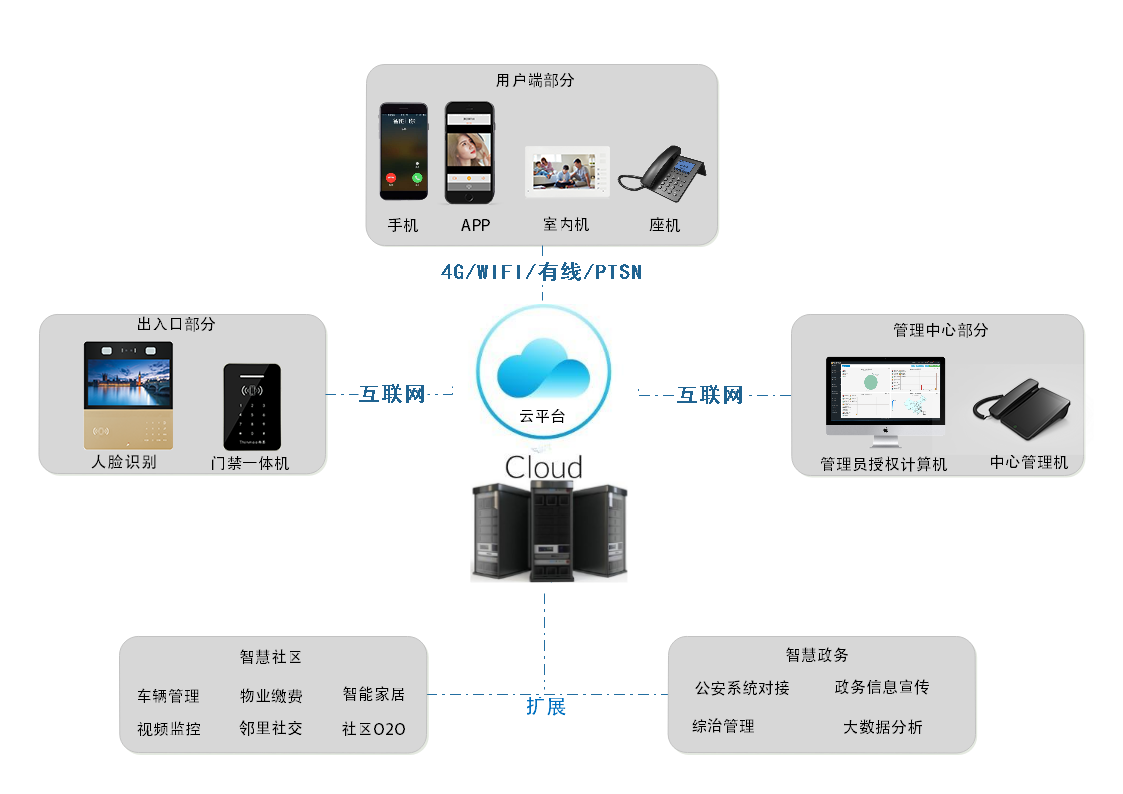
System architecture diagram
cloudplatform
The Thinmoo cloud platform is deployed in the cloud server, management community, housing building and housing data, household data management, household occupancy, card issuance authorization, face authorization, APP account and home phone number management. Centralized operation and maintenance of the front door machine, status alarm, software upgrade management. Advertising content, strategy, and delivery management of the door machine. It is connected with third-party platforms such as the public security department's population management system, property payment service system, and community commercial O2O system.
control center
The central management machine is installed in the property management office or the security duty room to realize the intercommunication with the door machine, unlocking, and intercommunicating with the indoor extension. The management center computer can log in to the cloud platform, and actually manages the accounts such as account opening, authorization, alarm, record inquiry, report browsing and printing of the residents of the community.
Door end
Including access control intercom, door locks, door closers, power supplies and other equipment. The access control intercom machine realizes the functions of calling room number, call intercom, and access control. The access control integrated machine supports off-line identification, and can transmit and process the information of the front-end personnel entering and exiting the face and the access control record information, captured photos, and short videos of the card to the system background for storage and processing.
门禁主机支持的开锁方式有:
- Owner identification unlock
The system can support: face recognition, Bluetooth, remote
- Swipe unlock
The system can support: IC card, ID card, citizen card, social security card
- Temporary password or QR code unlock for visitors
Supported guest locks are: temporary password, QR code
- Call intercom unlock
System support: call indoor unit, call center management machine, mobile phone/telephone, APP, indoor extension, etc.
user端
Depending on how the system is organized, the client can select indoor extensions, mobile APPs, mobile phones (voice channels), landline phones, indoor units, and so on.
- APP intercom unlock
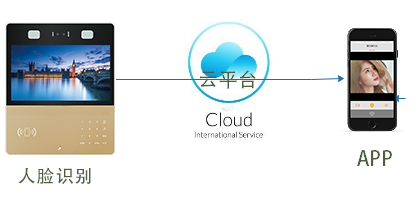
The cloud platform supports the mobile APP account (one or more) that calls the resident registration. The visitor enters the household number on the door machine, and the door machine initiates an intercom request to the cloud platform, calls each APP user registered in the house, rings at the same time, and any APP answers, performs audio and video intercom, and unlocks. The resident app can also monitor the door machine and provide a cloud access control (key bag) unlock function.
- Mobile/fixed telephone intercom unlock
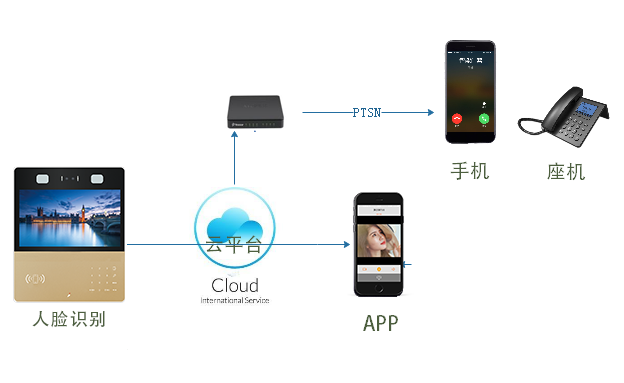
Install a management machine or indoor extension transfer call service in the property management office, register to the cloud intercom platform through the broadband Internet access line, set the telephone number information of the household on the cloud platform, and when the door machine calls the room number, the cloud The platform initiates a call to the household number (mobile or landline) via the IPPBX gateway. After the household phone answers, press the # key to unlock. The cloud platform can also set the paging call policy after the APP does not answer. When the resident APP does not answer or reject the call within a certain period of time (30 seconds, can be modified), the cloud platform calls the resident phone, connects the intercom, presses the # key to unlock,
- Indoor extension intercom unlock
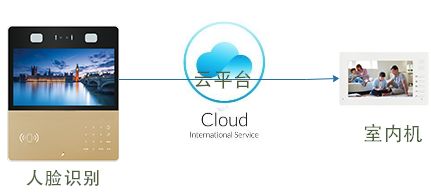
If the household has installed telecom broadband, the household can install the special indoor indoor extension of Ximo, and use the household wired broadband to access the cloud platform. When the door machine calls the household number, the indoor extension rings, listens to the intercom, and presses the # key to unlock. The indoor extension can also be used simultaneously with the APP; the cloud platform simultaneously calls the household APP and the indoor extension associated with the household.
System functions
Personnel registration
- The administrator can register the resident information in the business management platform, record the household/tenant identity information through the second-generation ID card identifier, and record the face information of the household/tenant through the platform.
- Associated with the corresponding house.
Issuing card authorization
- Management Center issuance authorization: The administrator can issue cards and cancel cards on the business management platform, and authorize the building door to authorize the cards. The cards that can be used as access control cards include: second-generation ID card, residence permit, IC/ID card, etc.
Cloud ban/cloud intercom
- Second-generation ID card / residence permit / IC card / face recognition unlock: the household or tenant uses the registered card or the face to unlock the card at the door machine;
- IC/ID swipe unlock: Residents or tenants can use an authorized card to unlock the card;
- Mobile APP to unlock the remote key package;
- Cloud intercom:
Including the door machine and the owner's indoor extension intercom press * key to unlock; door machine and mobile APP for video intercom, unlock; APP no answer, go to mobile / fixed telephone intercom, unlock.
Video linkage capture
- Door machine unlocking linkage capture photo: access control host card, APP, fixed phone / mobile phone, indoor extension unlock, door camera camera take a photo; upload to the background storage server.
- Can be linked to an external webcam for capture and video recording.
Unlocking linked video recording: When the door is unlocked, the video camera near the door machine will perform video recording of about 10S (depending on the factory settings), and can be uploaded to the background storage server.
Access control record management
- Access control entry and exit record report: The business management platform can retrieve the entry and exit records through ID card number, building number and date and time range to form a statistical analysis report.
Equipment management
- Online detection: real-time monitoring of the online status of the device. When the device status is abnormal, the system can give a fault alarm or prompt;
- Online management: Device maintenance and management through the cloud platform, remote configuration of devices, software upgrade and maintenance.
Advertising
- In the cloud platform management side, the image is used to advertise to the door machine, and multiple picture material rotations and playback strategies are supported.
Floating population management
- The system can realize the connection with the public security population information system at all levels; it can provide the resident population based on the video access control system, the management of the floating population, the focus of the population, and the target control alarm function; for details, see the video access control and mobile population management related to Ximo. solution.
Scalable application
The system cloud platform can be connected with other intelligent hardware systems, such as smart home, video surveillance, parking lot, etc.; the property integrated service system, the neighborhood social forum, the online business super system realizes the docking, realizes the intelligent community integrated operation management platform function, and satisfies the smart community. Operational needs.
Introduction to use
At the entrance of the community, the entrance of the building unit is equipped with an access control intercom, power supply, network cable (or 4G wireless), access to the Internet network; and interconnection with the cloud platform.
各种对讲开锁方式说明:
- APP
In the background, the household data of the household data is registered, and the landlord/household downloads and installs the Guanjia APP or the Ximo partner APP, and the APP user registers with the corresponding community and house. After the APP logs in online, when the visitor calls the room number at the unit/fence door machine, all the household APPs of the house can receive the call prompt, and the door machine pushes a picture of the visitor. After the connection is made, a video intercom can be performed. Press the unlock icon button to unlock. At any time, the APP provides a key package unlocking entry, selects the authorized door machine name, and clicks the unlock button to open the door lock. The APP can monitor the authorized door machine camera to view real-time image sounds. The experience is poor in places where the 4G network signal coverage is weak.
- Fixed line/cell phone
The cloud platform calls the fixed line, and the mobile phone has two ways. First, the property company installed the IPPBX telephone exchange, installed 2-4 fixed telephone lines to the telecom operator's telephone network; the second adopted the Internet landing telephone gateway. IPPBX or Internet gateway and cloud platform are interconnected. The door number is called at the door machine, and the household APP does not answer within a certain period of time, and can be transferred to the phone number (mobile phone or landline phone) registered by the resident in the background. After the call is connected, the phone will press the # key to unlock.
Note: The cloud platform also supports direct call mobile mode, skipping the APP call link.
- Indoor extension
Residents have home broadband, West In-Mex indoor extension access to Internet routers, configuration network, SIP server and account parameters. Call the resident number at the door machine, ring the indoor extension, answer the intercom; press the # key to unlock.
Cost analysis
- APP
The mobile APP uses 4G traffic or WIFI network access. The Wifi network extends the broadband network for homes or businesses, and the cost burden can be neglected. Under the 4G network, the traffic increase is not large. The intercom is 5 times a day. Each video intercom is 10 seconds long. The daily traffic is 512Kb/s*10s*5=3.2MB. The monthly cost is 100MB. According to the current 4G user package tariff standard in most regions, the cost of 100MB traffic is less than 1 yuan.
- Fixed line/cell phone
The property company purchased the IPPBX telephone exchange based on the number of concurrent roads and received multiple telephone lines, about 1,000 yuan. Or use the Internet landing gateway to access the operator's telephone network. The telephone charges generated are 0.1 yuan/minute, and the tariff rates of operators around the country are slightly different. The door machine can set a 1-minute call duration limit. Taking a cell door machine of 20 cells and calling 20 times a day for example, the monthly telephone cost of the community is about 20*20*0.1*30=1200 yuan. It can be shared by each owner according to the number of calls.
- Indoor extension
West ink indoor extension machine, access to the home Internet cable. The door machine calls the indoor extension intercom, no additional cost support, just purchase the equipment fee.The indoor unit can be docked to the smart home, and there is an interface reserved for connecting to the smart home. If you need to dock the fresh air system, you need to provide the docking documents to the company, and the technology will determine the reply.。
To sum up: the Ximo cloud intercom system can complement each other and flexibly deploy according to the actual project needs of each community.

 English
  简体中文
简体中文